













Obtenir le modèle :
Résumer cet article avec :
Managing collections is essential for every company. Its goal is to ensure that all invoiced revenue is collected within the agreed payment terms.
An effective collection strategy, supported by powerful accounts receivable software, helps optimise cash management. And cash flow is what determines, among other things, a company’s capacity to grow, and sometimes even to survive.
Accounts receivable software meets the need for time savings and more precise monitoring of the outstanding amount.
It enables a more structured, data-driven approach to collections management.
In this complete guide to accounts receivable software, you’ll find:
- A comparison of the best accounts receivable software for 2026 and what makes each one unique
- The key benefits of using accounts receivable software, driven by its core features
- The selection criteria to help you choose the right one for your business
With this guide, you’ll be fully equipped to make an informed, confident choice that fits your company’s needs perfectly.
The best accounts receivable software for 2026
Here’s our comparison of leading accounts receivable software on the market (non-exhaustive list).
Accounts receivable software: definition
An accounts receivable software is a powerful tool that streamlines debt collection and reduces late payments by automating many time-consuming tasks.
It gives you a clear, real-time view of your entire outstanding amount and helps you quickly identify which customers to follow up first.
It also makes it easier to send reminders for overdue invoices and offers debtors simple payment options to settle what they owe.
Accounts receivable software is different from invoicing tools, which are designed to manage the creation, transmission and archiving of sales invoices, and their integration into the accounting system. Invoicing tools may also handle purchase orders, delivery slips and related processes.
Now that we’ve defined what accounts receivable software is, let’s explore why adopting one is a smart move for your business.
Why choose an accounts receivable software?
You’re probably already managing collections internally, maybe using Excel, or directly through your invoicing system.
So you might wonder: why switch to an accounts receivable software?
- Excel allows you to run detailed calculations and set up a basic follow-up process at the start of your collection strategy.
- But as soon as the volume of invoices grows, Excel becomes a burden: too time-consuming, prone to errors, and a major source of stress.
- As for your invoicing or ERP software, while some offer reminder modules, they’re usually limited and lack advanced features.
Whichever method you use today, it’s probably difficult to have a clear, real-time overview of your receivables and customer reminders.
Let’s look at the benefits of adopting an accounts receivable software.
It simplifies your entire collections process by enabling:
- Time savings: thanks to automation, you can focus on your core business or higher-value tasks.
- Margaux L., credit manager at a communications group, explains that she used to spend a full week each month managing reminders before using LeanPay. Now it only takes her two hours!
- Better analysis: an accounts receivable software gives you reliable, real-time data to help prioritise actions and make better decisions.
- It also allows you to measure the effectiveness of your collections strategy with greater precision.
- Improved cash flow thanks to shorter payment delays: with personalised, automated dunning plans, no overdue invoice gets forgotten.
- 97,5 % of invoices imported into LeanPay are paid during the dunning phase, and our customers reduce their DSO by an average of 40 %.
An accounts receivable software is just as valuable for an internal finance team as it is for an accounting firm managing collections on behalf of a client.
If you’re now convinced by the benefits of an accounts receivable software, let’s look at the key features it should include to truly deliver on its promises.
I find this debt collection software very functional, with excellent tracking of reminders and a clear, precise dashboard. Customer service is responsive.
Stéphanie H. - Collections Officer
Discover LeanPay 👉
Accounts receivable software: essential features
We’ve listed the 10 most important features every accounts receivable software should include.
1 – Connection between your accounts receivable software and accounting system
Integration should be your first consideration.
You’ll need to retrieve:
- issued invoices,
- payments received (to avoid following up on invoices already paid), and
- contact lists (so reminders go to the right person).
So make sure your accounts receivable software connects smoothly with your accounting or invoicing tool.
Most providers offer several integration methods. Some are quick to set up (via API connection), while others are more technical, requiring internal IT resources (for example, SQL connector development and file transfer via SFTP server).
2 – Customisable dunning workflows
Your accounts receivable software should allow you to create your own dunning scenarios because not all customers are followed up in the same way! The key is personalisation.
Your reminder plan should be adaptable according to:
- the interval between each action,
- the communication channel (email, SMS, call, letter, etc.),
- message personalisation with variables such as the contact’s name, the number of overdue invoices, total amount due, etc.,
- message tone and escalation level depending on delay severity,
- multilingual reminders when needed,
- automated sending of emails or SMS,
- automatic attachment of PDF invoices to reminder emails.
3 – Reminder history
A highly underrated but extremely useful feature, as many of our clients tell us.
Having full access to your reminder history within the accounts receivable software, including any comments (e.g. notes from a phone conversation), makes each follow-up far more effective, especially when multiple people handle collections.
Everyone has the complete case history at a glance, per invoice and per customer.
That’s the ideal setup.

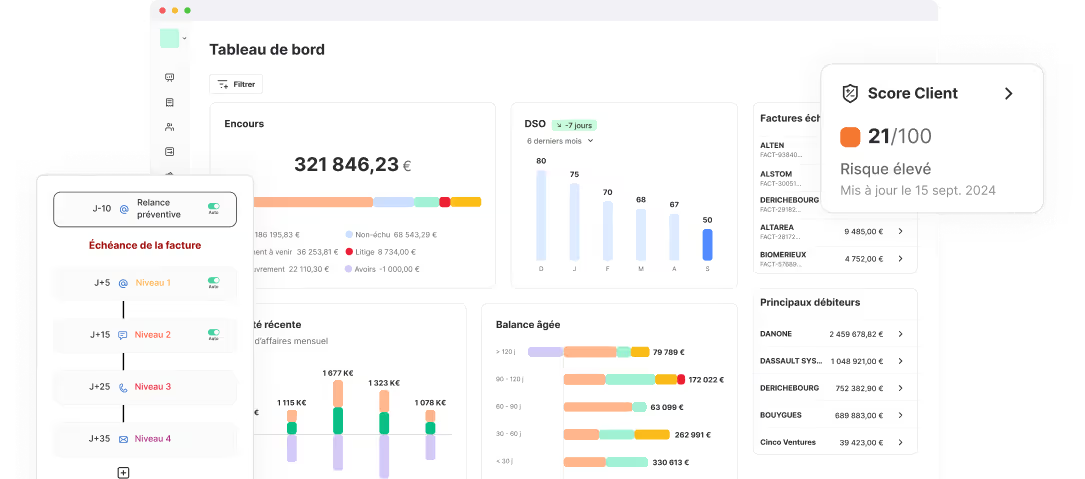
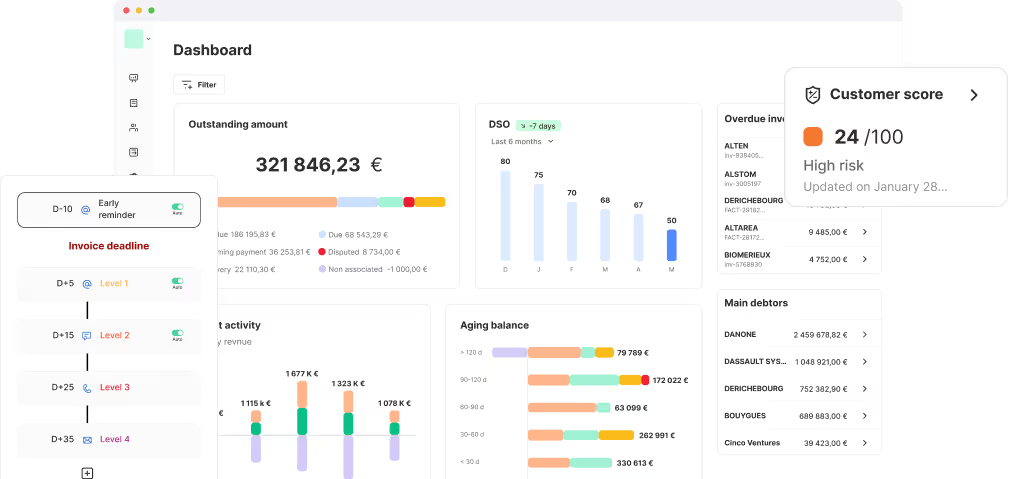
4 - Real-time tracking of collections KPIs
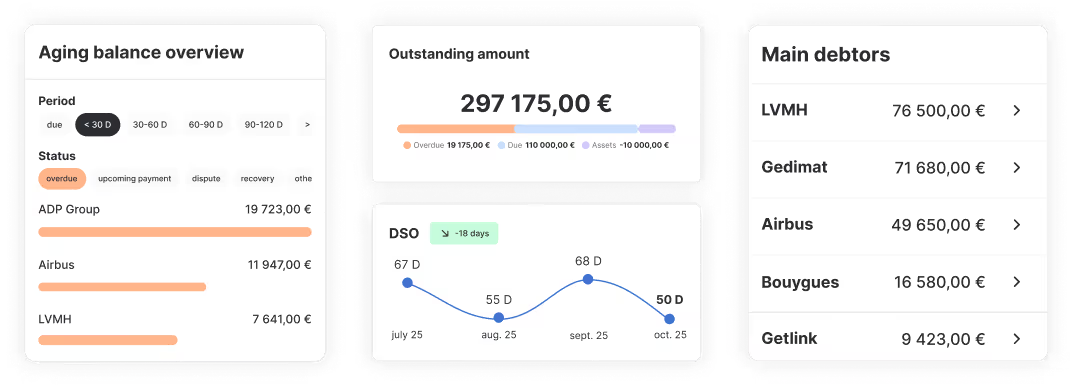
Tracking your accounts receivable performance is essential to measure the effectiveness of your collection strategy. Several key indicators should be available on a AR dashboard, including:
- the overall and per-customer DSO (Days Sales Outstanding),
- the aging balance,
- the outstanding amount (not yet due, overdue, under dispute, or credited),
- the cash collection forecast
- the impact of reminders on cash collections
Ideally, these metrics should be monitored in real time within your accounts receivable software. An API integration allows this continuous synchronisation. However, if data must be uploaded manually via a server, updates will only occur after each import.
5 - Risk management
Credit risk management is an important feature for preventing bad debt and protecting your company’s cash flow.
With accounts receivable software such as LeanPay, you can closely monitor your customers’ solvency thanks to integrations with financial information providers like Altares, Creditsafe, Ellisphere, Allianz Trade, Coface…
Key indicators, such as risk level, customer credit score, and authorised outstanding amount, are updated in real time, allowing you to maintain an agile collection strategy.
You’ll also receive instant alerts whenever a customer exceeds their authorised limit or enters insolvency proceedings.
This enables you to detect early warning signs and take the right decisions to mitigate potential risks.
Using an accounts receivable software that anticipates risk and helps adjust your strategy is the best way to strengthen your cash flow.
6 - Customer portal and online payments
Online payment is another essential feature. Your customer should be able to pay invoices at the most convenient time: ideally on the due date, not when the invoice is first issued.
Offering multiple payment options is even better, as it matches your customers’ preferred payment habits and helps simplify the process.
Providing them with a secure space where they can download both paid and outstanding invoices also saves significant time, since many responses to reminder emails are simple duplicate requests.
Choose an accounts receivable software that includes a “Pay my invoices” button directly in reminder emails, linking to a secure online payment portal.
That’s exactly what LeanPay offers and it makes a big difference in helping you get paid faster.
7 - Daily integration of cash collections
Updating customer payments is essential to ensure the proper operation of your accounts receivable software.
Of course, you should never chase a customer who has already paid their invoice, as this could damage your relationship with them.
Your accounts receivable software must therefore be able to collect all received payments:
- by connecting to your accounting system to analyse reconciliations made by your accounting team and update invoice and customer balances, or
- by connecting directly to your bank account(s) to perform automatic bank reconciliation, matching received payments with the corresponding invoices.
LeanPay offers numerous integrations that let you retrieve your data in real time.
8 - Multi-user access
The purpose of an accounts receivable software is also to centralise all information and make it accessible to leadership, accounting and finance teams, and sometimes the sales department.
Collaborative management is therefore a key factor when choosing your solution.
Being able to customise dashboards by customer portfolio (for sales reps and account managers) is a major advantage, allowing you to analyse collection performance by business sector, customer group, or account manager.
If you want to involve all your teams and maximise collections, choose a software solution that offers multi-user access, such as LeanPay.
9 - Ease of use and interface design
Every accounts receivable software claims to be simple and user-friendly.
The reality often varies, which is why requesting a demo is the best way to compare interfaces and ease of use.
Since one of the main goals of a dunning tool is to save you time, its use must be intuitive and ergonomic.
As design preferences differ, we’ll let you decide for yourself which interface feels most pleasant and efficient among the tools presented above.
10 - Customer support and onboarding
Even though an accounts receivable software should be easy to use, you may still need assistance at some point to improve your experience and optimise how you use the platform.
Having a dedicated customer success manager can be a huge advantage when choosing your software.
They can help you with several key areas:
- Data integration: while API connections are straightforward, other integration methods may benefit from guided setup,
- Product usage: ensuring you make full use of all features relevant to your needs,
- Everyday questions and troubleshooting as they arise.
Depending on the accounts receivable software provider, this support can take various forms: a dedicated contact, an in-app chat, online tutorials, or email support.
However, be aware that this service may differ across providers. It may either be included in your subscription at no extra cost, or offered as a paid add-on.
Discover all LeanPay’s features with a demo
Accounts receivable software: key selection criteria
All these features give you a better understanding of what the best accounts receivable software can offer.
But the other important factor in your choice is you! What are your company’s needs? What constraints do you face?
To help you decide, here are a few key criteria to consider when selecting your accounts receivable software.
Company size
Not all providers in the accounts receivable software market target the same audience or company profiles.
Whether you’re a small business, a medium-sized company, a large group, a franchise, or a professional services firm, each has different needs.
Choose the accounts receivable management software that best fits your company type, as its features and modules will be more aligned with your operations.
Feature requirements
Start by identifying your current collection processes and their pain points.
Where could improvements be made? Which features could an accounts receivable software bring that would make a real difference for your team?
Here are a few examples:
- Your finance team spends too much time manually attaching PDF invoices to reminder emails.
👉 Your accounts receivable software should automatically include PDF invoices as attachments.
- You want to measure the effectiveness of your collection strategy by comparing payment delays or analysing your aging balance structure.
👉 Your accounts receivable software should offer comprehensive tracking of your key receivables indicators: both globally and by customer, customer group, or account manager.
- You operate through multiple subsidiaries and invoice in different currencies.
👉 Your accounts receivable software must support multi-entity and multi-currency management, with a consolidated view across your organisation.
Your current tools
Here again, integration with your current tools is critical, since you need to collect data (invoices, payments, customer contacts) and inject it into the accounts receivable software.
“Modern” tools such as Quickbooks, Pennylane or Chargebee offer API connections, which makes integration easier.
For more “traditional” accounting solutions like Sage, SAP, Dynamics and others, the integration method can vary depending on the accounts receivable software and may take longer. It can take up to 3 weeks and may involve additional fees.
At LeanPay, we prioritise API integrations. The connection is ultra fast: in just two clicks, both systems are synchronised.
Your budget
Unsurprisingly, budget will also influence your final choice.
Some accounts receivable software products come with a large feature set, which naturally increases the subscription price. Consider whether you truly need all of these modules.
Depending on the software, you may also need to factor in integration fees, training options, or support services.
In any case, make sure you clearly understand all related costs before committing to any accounts receivable software.
The demo and trial period
If you are hesitating between several tools, we strongly recommend requesting an online demo of the accounts receivable software.
This will let you see for yourself which features are essential for your operations, as outlined above.
It is also the right time to ask all your questions and get tailored answers.
Next, take advantage of free trial periods to use the accounts receivable software with your own data. This is the best way to assess how well the solution fits your needs and to verify its usability.
Be aware that not all software vendors offer a free trial.
Request a LeanPay demo
Book a demo to explore LeanPay with your own data.
Obtenir le modèle :
Obtenir le modèle :