




Coface

Make the management of your customer risk easier thanks to the Coface integration. Find your coverage and the score of your customers on LeanPay.

3.000+ CFO use LeanPay
Rated 4.93/5 on Capterra, Trustpilot, GetApp, Appvizer & Google
Create my accountBook a demo

How the LeanPay x Coface integration works

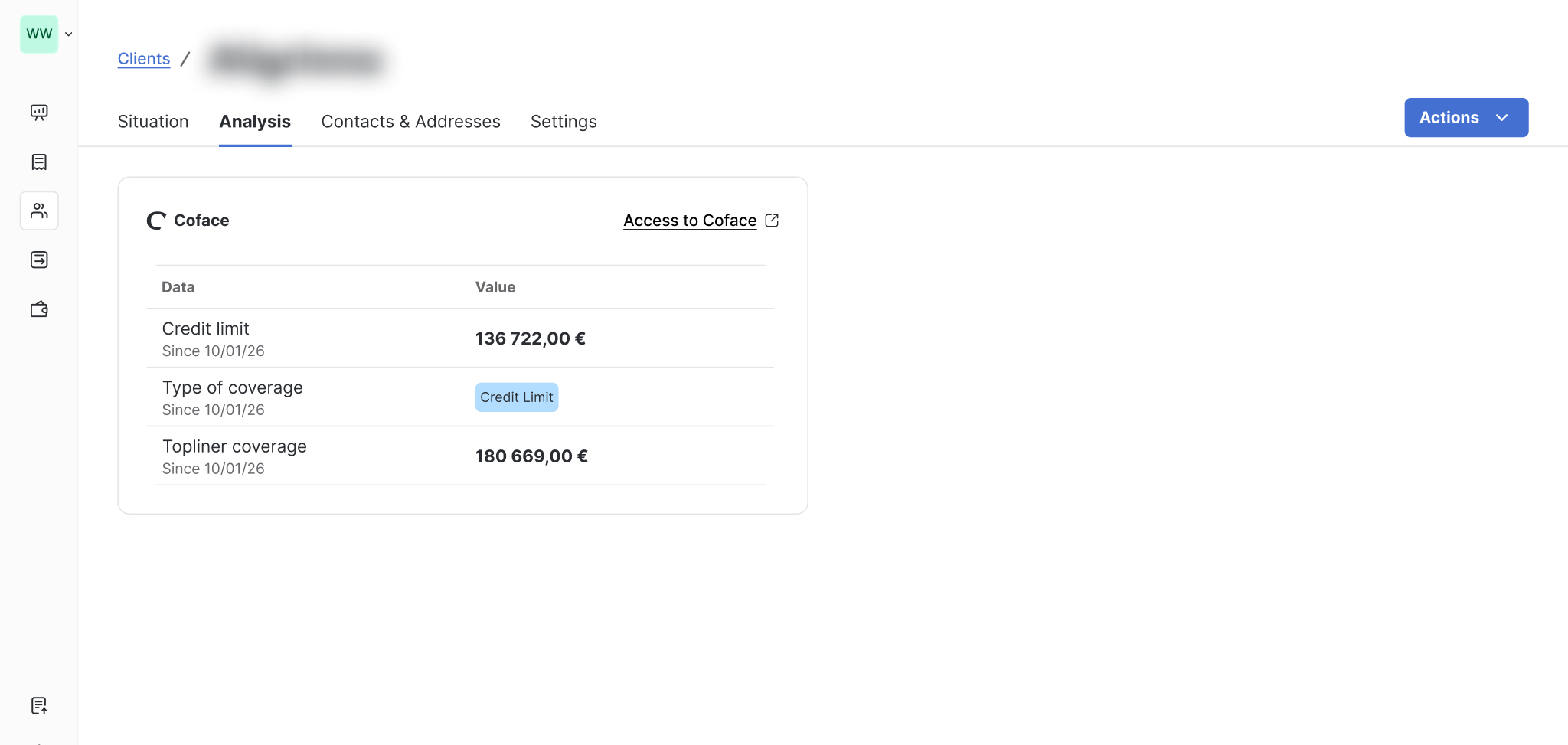
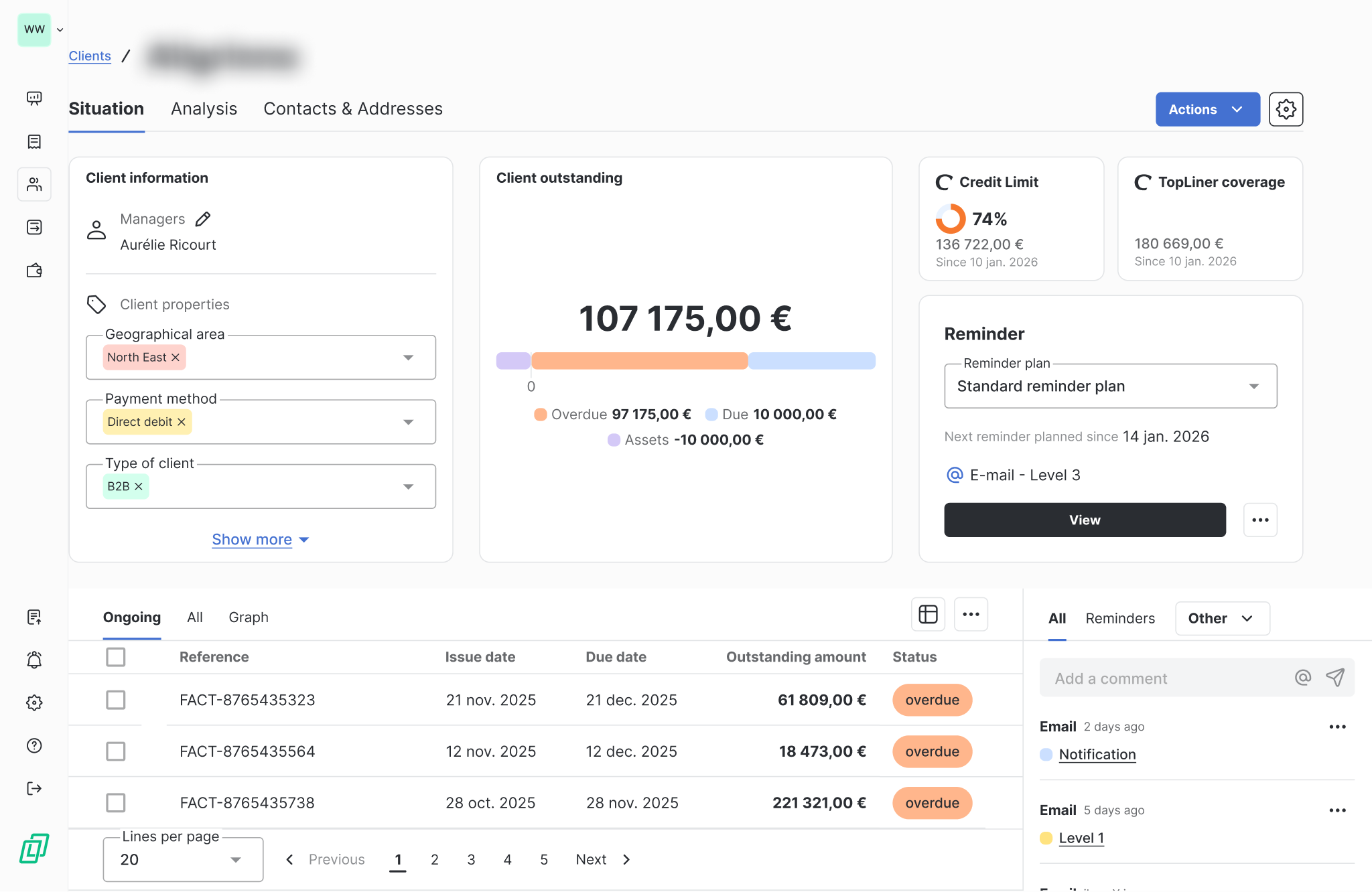
LeanPay integrates with Coface in order to allow you to directly view the amounts of your credit insurance in the app. This integration simplifies the management of your credit insurance contracts by centralising all key indicators in one place.

In LeanPay, you can find in particular:

  • Your credit limits, with the authorised amount and the Percentage reached, represented by a color code for quick reading,
  • your type of coverage,
  • your TopLiner cover (additional warranty),
  • The date of last update insured amounts.

This information is accessible at several levels of the application: from the customer list, on the customer summary sheet, as well as in the tab "Analysis" of the customer file.

One direct link to your Coface personal space is also available.

About Coface

Coface supports businesses in the commercial credit risk management for nearly 80 years, in order to help them develop and navigate an uncertain and volatile economic environment. A player committed to trade, Coface is recognised as a global reference in this field.

Present on nearly 200 markets, Coface supports the development of 100,000 businesses, regardless of their size, location or field of activity.

The group offers a full range of solutions covering credit insurance, information services, debt collection, Single Risk insurance, bond and factoring.

Every day, Coface relies on its expertise and on cutting-edge technologies to facilitate trade, on domestic and export markets.

à propos de notre intégration

Why use the integration between Coface and LeanPay?

Quick and easy connection

In 2 clicks, LeanPay connects to Coface and automatically imports the key information from your credit insurance contracts.

Centralised view of your coverage

Credit limits, coverage type, TopLiner, and update dates are accessible directly in LeanPay, for a clear view of your coverage level.

Safer decisions on your customer outstandings

By comparing the amounts insured with the actual outstanding amount, you can quickly assess your exposure and adapt your actions more proactively.
à propos de notre intégration

3 steps to connect your tools

Create your LeanPay account
Configure your settings
Create your LeanPay account
Configure your settings
Once the SMS option is activated, set the sender name for your SMS messages.
Set up your LeanPay workspace according to your company to start centralizing your customer data.
Set up Electronic Registered Delivery in LeanPay, including letter templates and sender details.
Set up your LeanPay workspace to centralise your customer data.
Set up your LeanPay workspace according to your company to start centralising your customer data.
Define the sending settings for your standard or registered letters: sender address, logo, footer, etc.
Sync your data
Add an SMS step to your reminder plan
Connect your Outlook business email
Connect your Gmail business email
Add the Electronic Registered Delivery step to your reminder plan
Connect your Infolegale account
Importez vos données
Connect your Creditsafe account
Add a letter step to your reminder plan
Credit limits, coverage type, TopLiner, and update dates are accessible directly in LeanPay, for a clear reading of your coverage level.
Centralise your email
Emails sent and received are automatically synchronised in LeanPay.
Centralise your email exchanges
Emails sent and received via Gmail are automatically synchronised and stored in LeanPay.
Send your first Electronic Registered Deliveries
Validate the sending of Electronic Registered Deliveries from your reminder to do list once the delay threshold is reached.
Send your first SMS
Start sending your first reminders
Send your first letters
Choose between automatic sending managed by LeanPay or manual approval of each message.
Your two tools are now connected
Approve sending from your reminders to-do list or let LeanPay handle dispatch automatically according to your settings
Retrieve your Infolegale data
Récupérez vos données
Get your Creditsafe data
LeanPay automatically imports the credit opinion, the Infolegale score, their historical changes and all available information for each customer.
LeanPay importe automatiquement l’ensemble des informations disponibles pour chacun de vos clients.
LeanPay automatically imports credit scores, credit limits, and financial health events for each of your customers.
Import your coverage
LeanPay automatically retrieves credit insurance contracts and amounts covered for each of your customers.

They already connected their accounting software to LeanPay

logo brut.Logo Le Pointlogo atm plasturgielogo tout fairelogo labeliumlogo fedrigonilogo nercologo gimslogo negometallogo vivaticketlogo dernier cri
Connect your software with LeanPay now
Contact our sales team to benefit from the integration and start optimizing your debt collection
Book a demo

Your questions about our integration with Coface

Are there any fees for using the Coface module?
icone plus

Yes. Using the Coface connector is an option. The rate depends on your LeanPay subscription.

What Coface information is synchronised in LeanPay?
icone plus

LeanPay centralises credit limits (amount and percentage reached), the type of cover, the TopLiner cover, as well as the date of last update insured amounts.

How often is Coface data updated?
icone plus

The information is updated as soon as it is available following synchronisation with your Coface account.

How does LeanPay help me keep track of my coverage levels?
icone plus

LeanPay allows you to compare Insured amounts with the Actual outstanding of your customers, thanks to visual indicators that facilitate the identification of risky situations.

Does the integration require technical configuration?
icone plus

No, just send a connection request from the LeanPay settings. The LeanPay teams then take care of the activation with Coface.

Debt collection connected to your tools

MySendingBox
MySendingBox
Reminders
Reminders
MySendingBox
MySendingBox
Reminders
Reminders
smsmode
smsmode
Reminders
Reminders
smsmode
smsmode
Reminders
Reminders
Infolegale
Infolegale
Risk management
Risk management
Infolegale
Infolegale
Risk management
Risk management
Maileva
Maileva
Reminders
Reminders
Maileva
Maileva
Reminders
Reminders
Microsoft Outlook
Microsoft Outlook
Reminders
Reminders
Microsoft Outlook
Microsoft Outlook
Reminders
Reminders
Atradius
Atradius
Debt Collection
Debt Collection
Atradius
Atradius
Debt Collection
Debt Collection
Ellisphere
Ellisphere
Risk management
Risk management
Ellisphere
Ellisphere
Risk management
Risk management
Creditsafe
Creditsafe
Risk management
Risk management
Creditsafe
Creditsafe
Risk management
Risk management
Altares
Altares
Risk management
Risk management
Altares
Altares
Risk management
Risk management
Stripe Billing
Stripe Billing
Online Payment
Online Payment
Stripe Billing
Stripe Billing
Online Payment
Online Payment
Allianz-Trade
Allianz-Trade
Credit insurance
Credit insurance
Allianz-Trade
Allianz-Trade
Credit insurance
Credit insurance
Gmail
Gmail
Reminders
Reminders
Gmail
Gmail
Reminders
Reminders
See more

Découvrez nos clients qui utilisent cette intégration

No items found.
Join 3 000+ finance teams who collect cash faster with LeanPay
Download our brochure
debt collection software leanpay